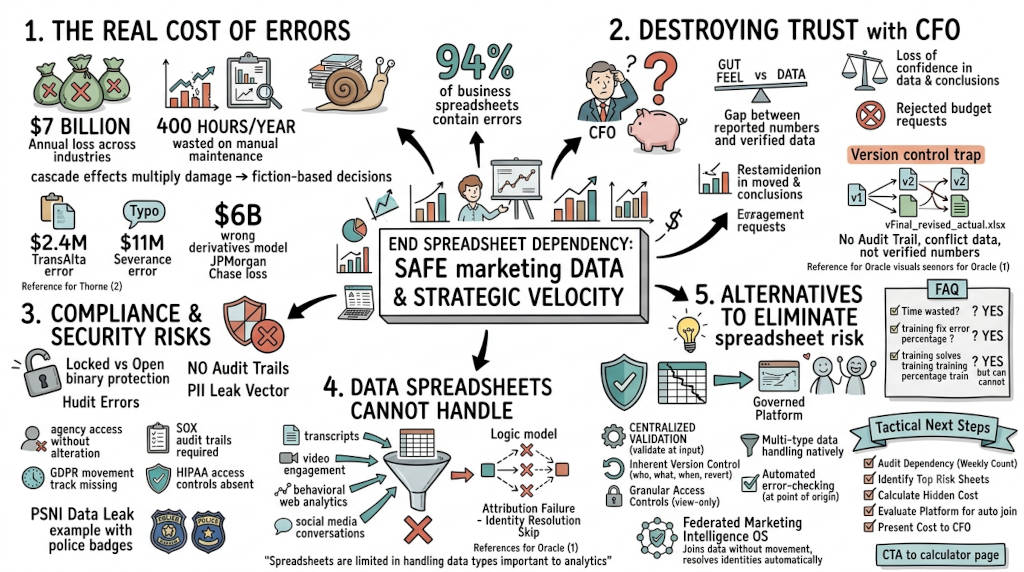
Summary: Manual spreadsheets jeopardize data integrity through human errors, poor version control, and lack of governance, leading to costly mistakes like the $11 million severance payout and £16 million bank undervaluation. Risks amplify in teams due to conflicting versions and absent audit trails, while spreadsheets struggle with unstructured data types. Alternatives include governed analytics platforms offering centralized validation, automated error-checking, granular access controls, and native handling of diverse data. For marketers, a Federated Marketing Intelligence OS connects sources without movement, resolves identities automatically, and delivers trusted answers, eliminating spreadsheet-based risks while enabling scalable, secure decision-making.
Spreadsheet errors cost your organization more than time. They cost your boardroom credibility, expose you to compliance risk, and drain millions in hidden value. The evidence is not theoretical. In 2022, a single formula mistake cost Íslandsbanki £16 million. A missing minus sign at Fidelity overstated $2.6 billion in expected distributions. And 94% of business spreadsheets contain at least one error. Your marketing data should not run on the same infrastructure as someone's grocery list.
1. What is the real cost of spreadsheet errors in marketing?
The Answer: Spreadsheet errors cost organizations an average of $7 billion annually across industries (Oracle, 2023). For marketing teams specifically, the hidden cost is not just bad data — it is the 400 hours per year your team spends maintaining spreadsheets instead of running campaigns.
The financial impact compounds across three levels. First, direct errors cause immediate losses (Thorne, 2024). JPMorgan Chase lost $6 billion in 2012 when a faulty Excel model underestimated derivatives risk. TransAlta lost $24 million from a copy-paste error in a bidding spreadsheet. A U.S. manufacturer paid $11 million in extra severance because an analyst added one extra zero (Oracle, 2023).
Second, cascade effects multiply the damage. A single incorrect figure in a marketing budget spreadsheet flows into ROAS calculations, campaign optimization, and executive P&L reports. By the time someone spots the error, the team has already made decisions based on fiction.
Third, the opportunity cost dwarfs both. Your best analyst spends Friday afternoons VLOOKUP-ing Google Ads data into a master sheet instead of finding the next growth channel.
The 94% problem
Research spanning 35 years consistently shows that 90% of spreadsheets with more than 150 rows contain at least one major mistake (Thorne, 2024). A 2024 literature review in Frontiers of Computer Science confirmed that roughly 94% of spreadsheets "in use" have faults (Tang, 2024). Compare that to mission-critical software, which targets less than 0.1 defects per 1,000 lines of code.
2. How do spreadsheet errors destroy trust with your CFO?
The Answer: When your CFO asks for marketing ROI and you present numbers from a spreadsheet, they have no way to verify the data. No audit trail. No data lineage. No way to prove the number is real. That is the Executive Trust Gap.
The problem is structural. Spreadsheets offer no native audit capabilities. When errors occur, it is nearly impossible to determine who made what change and when (Tang, 2024). This matters most in the boardroom. A CMO who cannot defend their numbers to a CFO has already lost the argument.
Oracle's analysts describe the result as a "loss of confidence in the data and conclusions" that forces decision-makers to revert to gut feel (Oracle, 2023). For a CMO, that means budget requests get rejected. Campaign performance gets second-guessed. And your strategic recommendations carry less weight than intuition.
The version control trap
When multiple team members update a marketing performance spreadsheet, the workflow creates copies. "Final_v2.xlsx." "Forecast_Marketing_Update.xlsx." These files proliferate across shared drives, email attachments, and personal folders (Oracle, 2023). No one knows which version has the correct data. Teams make decisions on conflicting information. The CMO presents Q1 numbers that do not match finance's Q1 numbers.
3. Why are spreadsheets a compliance and security risk for marketing leaders?
The Answer: Spreadsheets offer binary protection — locked or open. There is no way to give your agency view-only access while preventing them from altering your budget model. There is no way to let the sales team update lead counts without exposing compensation data.
In regulated industries, this creates direct compliance exposure. GDPR requires organizations to track how personal data moves through systems. SOX requires audit trails for financial reporting. HIPAA requires access controls for protected health information. Spreadsheets cannot provide any of these.
Marketing teams handle high-value data — customer PII, campaign spend, attribution models, competitive intelligence. Storing this in uncontrolled spreadsheet files creates a breach vector that compliance teams cannot monitor. The 2021 PSNI data leak exposed the personal details of 10,000 police officers because of a hidden spreadsheet tab.
The missing enforcement problem
Spreadsheets lack data type validation. There is no way to ensure a "Date" column contains valid dates or a "Currency" column excludes text entries (Oracle, 2023). This flexibility becomes a liability when compliance auditors ask how you verify data integrity.
4. What data types can spreadsheets not handle for marketing analytics?
The Answer: Spreadsheets are built for rows and columns of numbers. Modern marketing runs on unstructured data — customer service transcripts, social media conversations, behavioral web analytics, video engagement metrics, multi-touch attribution sequences. Spreadsheets cannot process these data types without dangerous simplification.
When analysts force unstructured data into cells, they truncate text, create arbitrary numbering systems, and lose context. The result is analysis that misses critical patterns and misrepresents complex customer behavior.
Oracle states it directly: "Spreadsheets are limited in handling data types important to analytics efforts, especially unstructured data, such as large text documents" (Oracle, 2023). For a CMO trying to understand customer sentiment across channels, this limitation is a dealbreaker.
The identity resolution failure
Marketing attribution requires connecting the same person across Google Ads, LinkedIn, email, and your CRM. Spreadsheets cannot do this. Your team manually matches rows using email addresses or names — a process so error-prone that most marketing teams simply skip it and report channel-level metrics that double-count conversions.
5. What alternatives eliminate spreadsheet risk?
The Answer: Purpose-built analytics platforms replace manual spreadsheets with centralized data management, automated validation, and governed collaboration. The shift from file-based to platform-based workflows removes human error from critical data processes.
Effective alternatives share five capabilities:
Centralized validation. Systems enforce data types, validate ranges, check for duplicates, and flag anomalies at input (Tang, 2024). Errors are prevented, not detected later.
Inherent version control. Every change carries user attribution, timestamps, and the ability to revert. No more "Final_v2_revised_actual.xlsx."
Granular access controls. Grant view-only access to agencies. Allow analysts to edit specific datasets. Protect financial models from alteration.
Multi-type data handling. Process structured, semi-structured, and unstructured data natively. No simplification required.
Automated error-checking. Continuous validation across the analytical workflow catches errors at the point of origin.
Marketing-specific: The Federated Marketing Intelligence OS
For marketing organizations, a Federated Marketing Intelligence OS connects natively to Google Ads, GA4, CRM systems, and social platforms without moving data. It resolves identity relationships across channels automatically. It serves validated answers through natural language interfaces — eliminating the manual data preparation that introduces error.
FAQ
Q: How much time do marketing teams waste on spreadsheets per year? A: Marketing teams waste approximately 400 hours per year on manual data maintenance. That is 10 full work weeks per person.
Q: What percentage of spreadsheets contain errors? A: Industry research consistently shows 90% to 94% of real-world spreadsheets contain at least one significant error.
Q: Can better training fix spreadsheet errors? A: Training helps but cannot solve the structural problem. Spreadsheets place the burden of accuracy entirely on the user. Platform-based systems prevent errors at the design level.
Q: What is the biggest compliance risk from spreadsheets? A: The absence of audit trails and access controls. Regulators require proof of data lineage and restricted access for sensitive information.
Q: Do cloud-based spreadsheets solve the problem? A: Cloud collaboration tools improve version control but do not address formula errors, data validation, access governance, or unstructured data handling.
Tactical Next Steps
Audit your team's current spreadsheet dependency. Count how many marketing spreadsheets your team maintains weekly.
Identify the three spreadsheets that carry the highest decision risk — budget models, attribution sheets, and executive reports.
Calculate the hidden cost. Multiply 400 hours by your team's blended hourly rate.
Evaluate a platform that eliminates manual data joining and automated reconciliation.
Present the cost comparison to your CFO. Show them the spreadsheet hours versus platform cost.
CTA
See exactly where the hidden cost lives. Visit The Invisible Drain page to calculate how many hours your team loses to manual data work.
References
Oracle. (2023). 10 common spreadsheet risks and solutions for businesses. https://www.oracle.com/analytics/spreadsheet-risks/
Thorne, S. (2024). Spreadsheet errors can have disastrous consequences — yet we keep making the same mistakes. The Conversation. https://theconversation.com/spreadsheet-errors-can-have-disastrous-consequences-yet-we-keep-making-the-same-mistakes-219356
Tang, S.-F. (2024). Spreadsheet quality assurance: A literature review. Frontiers of Computer Science, 18, 182203. https://doi.org/10.1007/s11704-023-2384-6